
Rural employment records · Andaman and Nicobar Islands
Andaman and Nicobar NREGA Job Card List 2026–27: Check District and Gram Panchayat Records
Find the official job-card register, check your name and job-card number, and understand work, attendance and payment records.
If you are looking for a job card in the Andaman and Nicobar Islands, start with the official rural employment reporting portal. Choose the relevant financial year, select the Union Territory and then narrow the report by district, block and Gram Panchayat. Open the job-card or employment register to look for your household. The report may show the job-card number, registered household members and associated employment entries. CentralPortal explains how to use the public records; it does not issue job cards or operate the government database.
हिंदी में: अंडमान और निकोबार की नरेगा जॉब कार्ड सूची देखने के लिए सरकारी रिपोर्ट पोर्टल पर वित्त वर्ष, जिला, ब्लॉक और ग्राम पंचायत चुनें। इसके बाद जॉब कार्ड/रोजगार रजिस्टर में अपना नाम देखें।
Open the official job-card reporting portal
Use the government Panchayat reports page. If the menu changes, return to the official NREGA home page and follow the reporting links.
Key information at a glance
| Area | Andaman and Nicobar Islands (Union Territory) |
|---|---|
| Reporting period | Financial year 2026–27; older financial years may remain available |
| Record type | Job-card and employment register, work and muster-roll records |
| Administrative districts | South Andaman; North & Middle Andaman; Nicobar |
| Current employment framework | VB-G RAM G, effective 1 July 2026; historical records still carry MGNREGA labels |
| Employment guarantee | 125 days per eligible rural household per financial year under the current Act |
| Notified daily wage | ₹348 for Andaman wage region; ₹367 for Nicobar wage region, effective 1 July 2026 |
| Official access | Ministry of Rural Development NREGA portal |
The wage notification uses Andaman and Nicobar wage regions; those labels should not be confused with the Union Territory’s three administrative district names. Actual payable wages depend on recorded and measured work and the applicable government rules.
How to check the Andaman and Nicobar NREGA job card list
Use a phone or computer with a stable connection. The government portal may open separate report screens as you move between menus. These instructions explain the normal Panchayat-report route rather than promising a direct search form that CentralPortal cannot control.
These screenshots show the reporting interface supplied for this guide. Some screens use historical MGNREGA labels; live government menus can differ. Follow the matching report names when the layout changes.
Step 1. Open the government reporting page
Visit the official Panchayat portal. The public page contains a section for Panchayat users, including a Generate Reports option. If you arrive on the main home page instead, look for Reports or the Panchayat reporting area.
हिंदी: आधिकारिक नरेगा वेबसाइट खोलें और पंचायत रिपोर्ट वाला विकल्प खोजें।
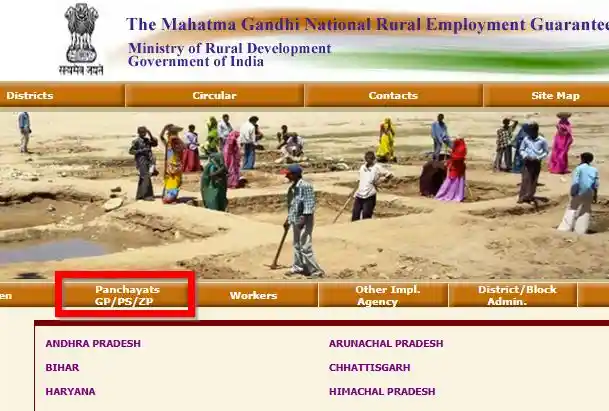
Step 2. Select the Panchayat reports route
Use the available Panchayats or GP/PS/ZP navigation where displayed. GP refers to Gram Panchayat, PS to Panchayat Samiti and ZP to Zilla Parishad. For household job cards, the Gram Panchayat reporting route is usually the most relevant.
हिंदी: Panchayats मेन्यू में Gram Panchayats चुनें।
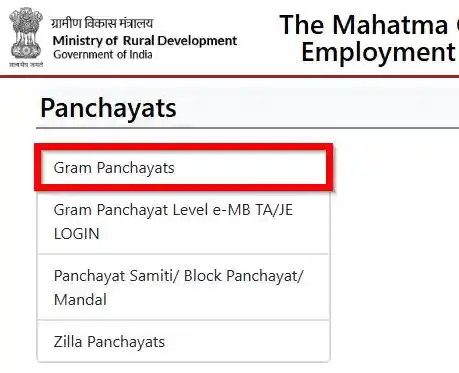
Step 3. Open Generate Reports
In the Gram Panchayat area, select Generate Reports. Do not confuse it with Data Entry, which serves administration and is not the normal route for checking a public job-card list.
हिंदी: पंचायत पेज पर Generate Reports विकल्प दबाएँ।
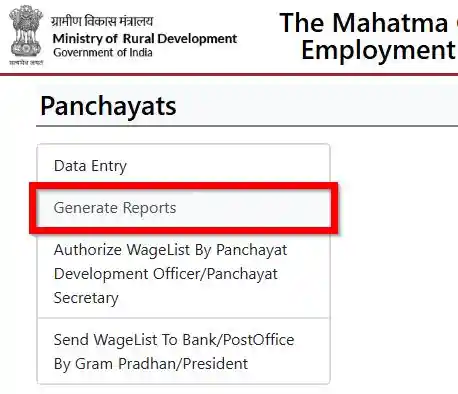
Step 4. Choose the financial year and Union Territory
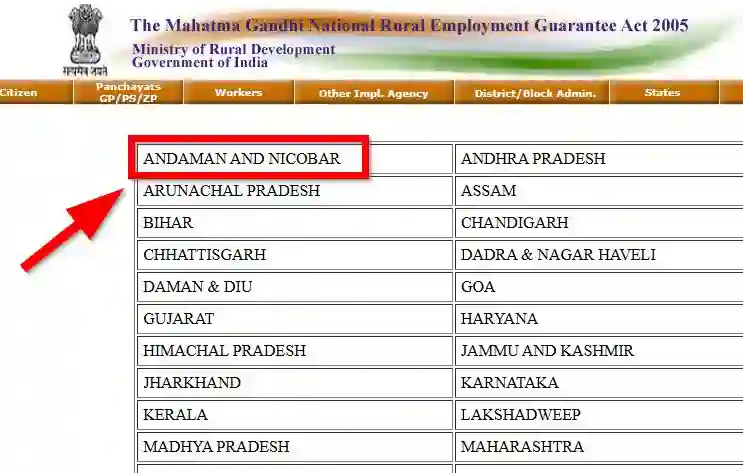
Choose 2026–27 when that is the reporting year you need. Then select Andaman and Nicobar Islands from the available State/UT entries. If a report is from an older financial year, select that year instead; a current-year search will not necessarily display every historical work entry.
हिंदी: रिपोर्ट मेन्यू में राज्य चुनें और Andaman and Nicobar पर जाएँ।
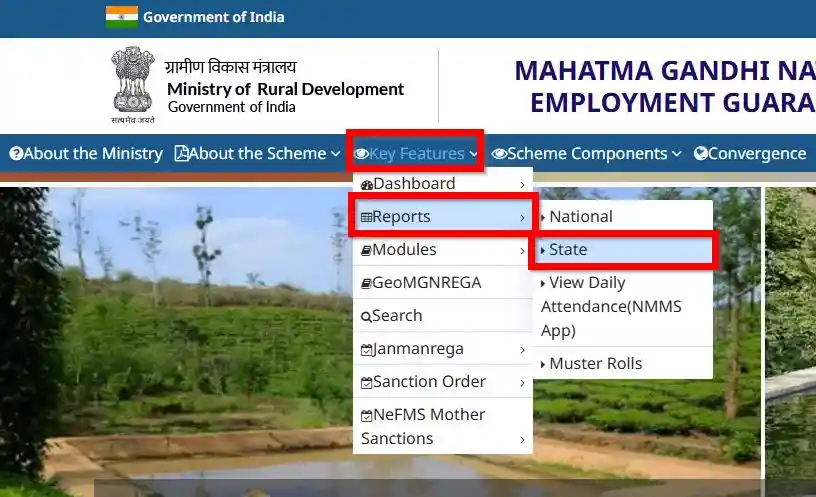
Step 5. Select the district, block and Gram Panchayat
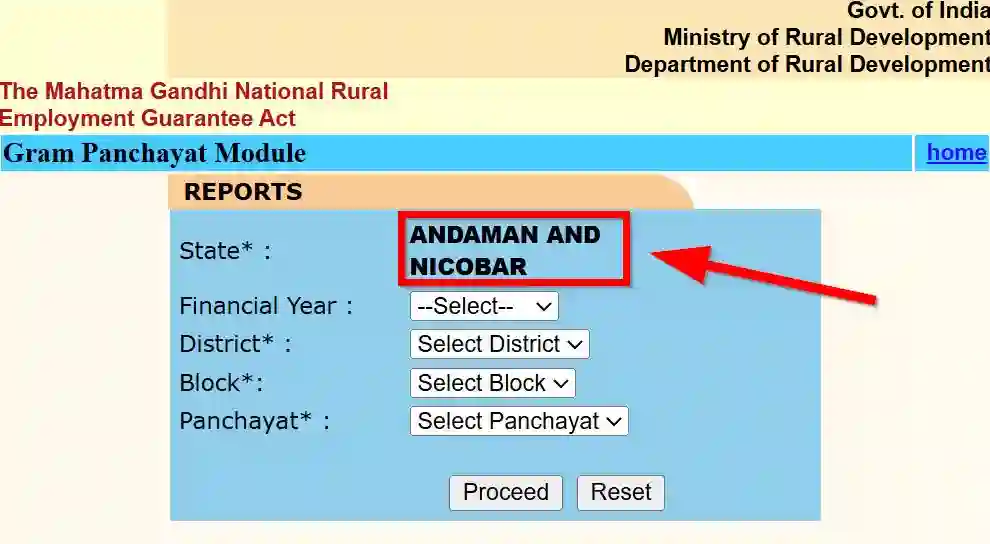
Use the location selectors in sequence. The district identifies the reporting area, the block narrows the administrative reporting unit, and the Gram Panchayat points to the local register. A village name is not always identical to a Gram Panchayat name, so check the correct Panchayat rather than choosing the first similar-looking village entry.
हिंदी: Gram Panchayat Module में वित्त वर्ष, जिला, ब्लॉक और पंचायत सही क्रम से चुनें।
Step 6. Open the job-card or employment register
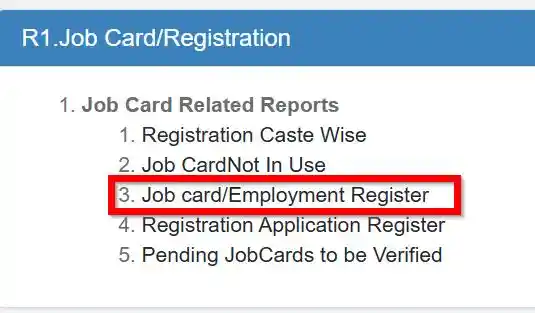
Under the report heading R1. Job Card/Registration, choose Job Card/Employment Register. Older interface versions and new scheme report systems may have slightly different menu labels.
हिंदी: R1 Job Card/Registration के नीचे Job Card/Employment Register खोलें।
Step 7. Find the household and open its details
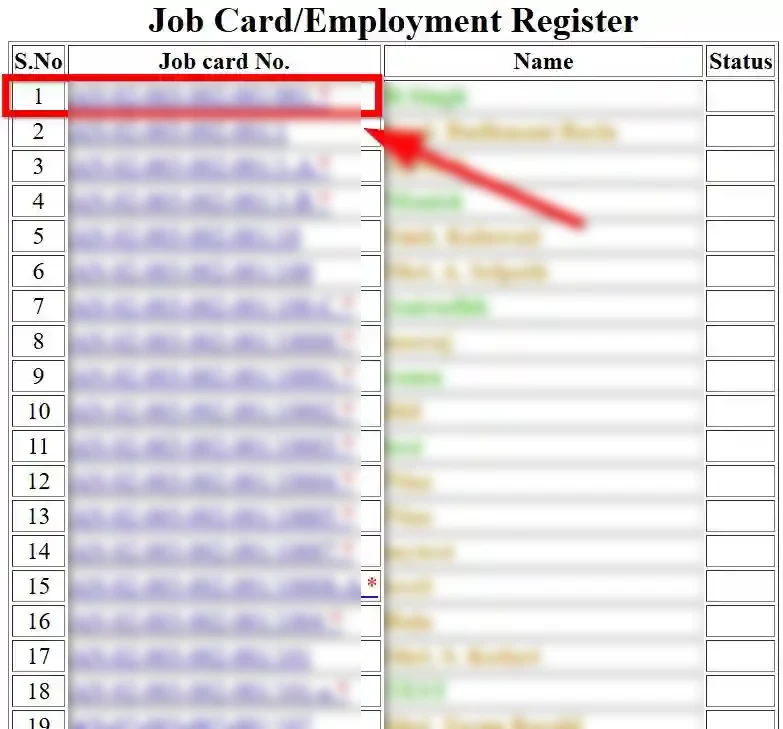
Look through the results for the registered household name and job-card number. If the page allows it, use your browser’s Find in page command to locate a surname or a known portion of the number. Check other household members before deciding an entry is missing. Select an available job-card link for more details.
हिंदी: सूची में जॉब कार्ड नंबर या परिवार के मुखिया का नाम पहचानें और संबंधित रिकॉर्ड खोलें।
District-wise job card list in Andaman and Nicobar Islands
The Union Territory has three administrative districts. In the public reporting system, older years or programme records may show different grouping conventions. Always follow the actual names offered by the government report for the financial year selected.
| District | How to locate records |
|---|---|
| South Andaman | Choose the corresponding reporting district, then the relevant block and Gram Panchayat. Check the local Panchayat name carefully, particularly where the village and Panchayat names differ. |
| North & Middle Andaman | Look for the reporting option covering your locality. Areas such as Diglipur, Mayabunder and Rangat are useful geographic references but are not substitutes for the block and Panchayat fields. |
| Nicobar | Select Nicobar when offered and narrow to the applicable local reporting unit. Island and village administration can differ from mainland assumptions; do not guess a Panchayat from a general place name. |
When the district you expect is absent, first check whether the portal uses an older reporting classification. Do not assume the job card was removed. It may simply be listed under a different district or programme hierarchy.
How to find a job card by name or number
In many public job-card registers, the most dependable method is to locate the correct Gram Panchayat first, then scan the household entries. A full-Union-Territory name search is not always offered. If the report lists clickable job-card numbers, open the entry to inspect details.
If you know the job-card number
Keep the number exactly as printed on your card, including its letters, digits and separators. Compare it to the register. If you find a similar record with a different prefix, check the household and locality before drawing conclusions.
If you only know the person’s name
Try the registered household head’s name and other known adult household members. Spelling, initials and transliteration can vary between government records and everyday usage. For a phone browser, the menu option may be labelled “Find in page”; on a computer, use Ctrl+F or Command+F.
Practical check: record the financial year, district, block and Gram Panchayat you searched. Those details are more useful when asking a Panchayat office for assistance than a screenshot of “no results” alone.
How to save or print a job-card record
After opening the correct household entry, check whether the government page offers a Print or downloadable document option. Where no download control exists, use your browser’s print command and select Save as PDF, if supported. Keep the government page address or report heading visible when possible.
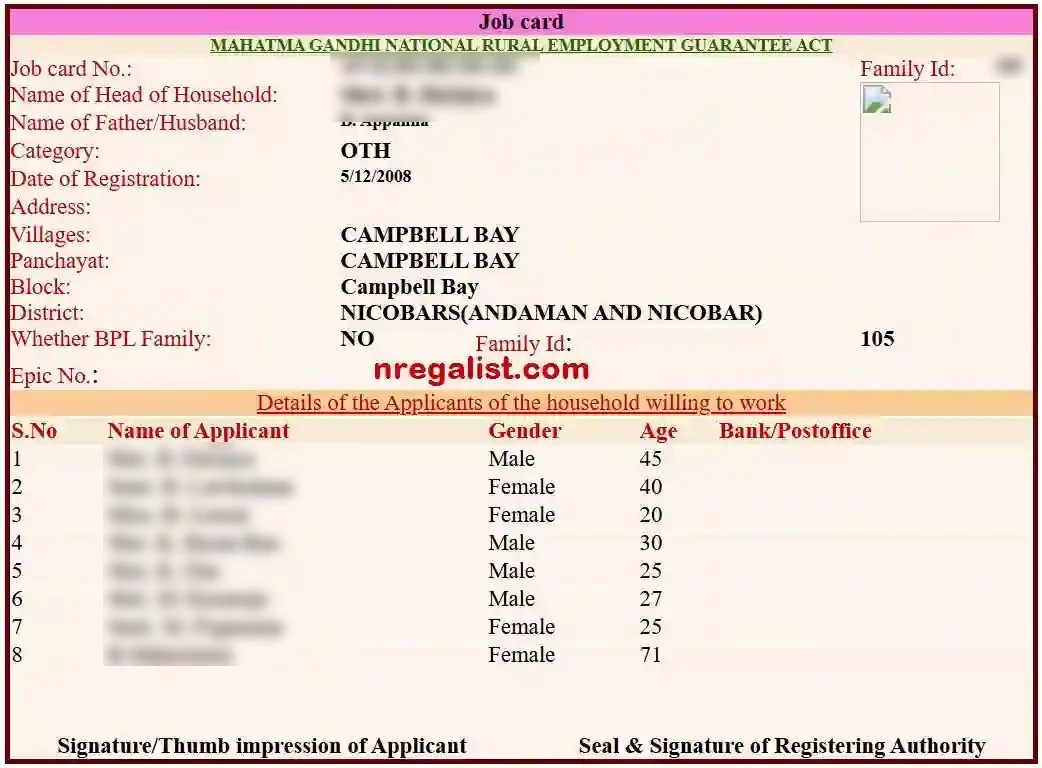
हिंदी: जॉब कार्ड का विवरण खुलने पर Print विकल्प से प्रिंट लें। डाउनलोड का विकल्प न हो, तो ब्राउज़र में Print → Save as PDF चुन सकते हैं।
An online printout can help you review your information, but it is not a replacement for a corrected or newly issued job card from the authorised local office. Avoid uploading job-card documents to unrelated third-party websites to obtain a download.
Registration, eligibility and the current employment guarantee
Rural employment registration concerns eligible rural households whose adult members are willing to undertake unskilled manual work. Registration and job-card issuance are administered through the prescribed local government process, not through CentralPortal. Anyone seeking a new card, adding an adult household member or correcting an entry should contact the responsible Gram Panchayat or programme office and ask which current application form and supporting records apply.
India’s VB-G RAM G Act came into effect on 1 July 2026 and provides a statutory guarantee of 125 days of wage employment per eligible rural household per financial year. Many government databases continue to expose historical MGNREGA-labelled records; that does not make them irrelevant when checking earlier employment or payments.
Wage rates for the 2026–27 period
Under the notification effective 1 July 2026, the notified daily unskilled manual wage is ₹348 in the Andaman wage region and ₹367 in the Nicobar wage region. The government notification—not a generic national rate—should be used when interpreting a record. The amount transferred for a particular work period can depend on the approved measurement, attendance and applicable programme rules.
The year 2026–27 spans a programme transition. For work undertaken before and after 1 July 2026, examine the record date and the rules in force for that period instead of applying one assumption to the entire financial year.
Check employment days, muster rolls and payment status
A job card identifies the registered household. It does not, on its own, confirm that wages for a particular work period were paid. For a more complete picture, compare the work allocation, muster roll, attendance, wage list and available payment transaction entries.
What the records mean
| Record | What to check |
|---|---|
| Job card | Household identity, registered adult members and linked work history. |
| Muster roll | Worksite, period, attendance and the worker entries recorded for that work. |
| Wage list | Wages processed for eligible work entries in the reporting system. |
| FTO/payment report | Processing or transfer status, which may not mean money has already appeared in the bank account. |
If you are missing wages, note the work dates, muster-roll number where shown, job-card number and payment reference before speaking to the local programme office. Separately check the bank or post-office account statement for actual credit. A report status should not be described as confirmed bank receipt unless the banking record supports it.
हिंदी: मजदूरी की जानकारी के लिए हाजिरी (Muster Roll), वेतन सूची और भुगतान की स्थिति अलग-अलग जाँचें। भुगतान दिखने का मतलब हमेशा बैंक खाते में पैसा आना नहीं होता।
Common problems and what to do
| Problem | Practical next step |
|---|---|
| Name not found | Confirm financial year and Panchayat, then check spelling and household-head name. |
| Wrong district appears | Inspect whether the selected report uses an older district grouping or programme classification. |
| Village missing | Check the Gram Panchayat covering the village; village and Panchayat names are not interchangeable. |
| Job-card number differs | Recheck the full prefix and separators. Ask the local office to verify the original register before assuming an error. |
| No print or PDF button | Use the browser print function. Do not rely on untrusted download services. |
| Portal is not loading | Retry the official home page or the reports menu. Save the relevant location selections for later. |
| Attendance differs from work done | Compare the work dates and muster-roll entry; raise the discrepancy with the responsible programme office. |
| Payment appears delayed | Compare wage-list and transfer reports with bank credit and take the references to the local office. |
Checking older NREGA records
If your job card was issued years ago or you need to investigate a previous work period, change the financial-year selector to the relevant historical year. Historical reports can preserve earlier district names, job-card formats and MGNREGA terminology. Record both the year and the government report heading when using older data to raise a correction request.
A household may have records across multiple financial years. This is normal: a job card and a yearly work or payment statement answer different questions. Do not judge an entire employment history from a single current-year list.
Frequently asked questions
Where can I check the Andaman and Nicobar job card list?अंडमान और निकोबार की जॉब कार्ड सूची कहाँ देखें?
Use the Government of India’s rural employment Panchayat reporting portal, then select the reporting year, location and job-card register.
सरकारी पंचायत रिपोर्ट पोर्टल पर वित्त वर्ष, जिला, ब्लॉक और ग्राम पंचायत चुनकर सूची देखें।
Can I search for a job card using only a name?क्या केवल नाम से जॉब कार्ड ढूँढ़ सकते हैं?
Usually you will first need the correct Gram Panchayat register. Search the displayed household entries for the registered name; a Territory-wide name search may not be available.
पहले सही ग्राम पंचायत की सूची खोलें, फिर उसमें अपना नाम या परिवार के मुखिया का नाम देखें।
Which financial year should I select?
Select 2026–27 for records from that financial year. Choose an older year if you are looking for earlier work or payment details.
Why does the portal show MGNREGA when the new Act is in force?
Older records and legacy report interfaces may retain their historical labels. The VB-G RAM G Act came into force on 1 July 2026.
How many days of employment are guaranteed?
Under the current VB-G RAM G framework, the guarantee is 125 days per eligible rural household per financial year.
What is the 2026–27 wage rate in the islands?
The notified rate effective 1 July 2026 is ₹348 per day for the Andaman wage region and ₹367 for the Nicobar wage region.
What if my village does not appear?
Check whether the village comes under a differently named Gram Panchayat and verify the correct block and reporting district.
Can I download an official job card from CentralPortal?
No. CentralPortal provides guidance and links; the government system is the source of official records. You can save a government record using its print control or your browser where supported.
Does a completed wage-list entry mean payment reached my bank?क्या वेतन सूची में भुगतान दिखने से बैंक में पैसा आ गया?
No. A wage list or transfer status may describe processing. Confirm actual receipt from the relevant bank or post-office account.
नहीं। बैंक या डाकघर खाते में जमा की पुष्टि अलग से करें।
Who should I contact to correct a job-card record?
Start with the responsible Gram Panchayat or programme office, bringing the job-card number, relevant register details and evidence of the error.
Official sources and editorial note
This guide uses the Government of India’s rural employment reporting pages, the Ministry’s 2026 programme announcements and Andaman and Nicobar district information. Government report labels and availability can change. For a decision about registration, entitlements, correction or payment, refer to the appropriate official record and local programme office.
Core sources: Government Panchayat reports; Ministry announcement on the July 2026 transition; Andaman and Nicobar Administration.
CentralPortal.in is an independent information website and is not affiliated with the Government of India or the Andaman and Nicobar Administration. Job-card applications, changes and payment decisions are handled by the authorised government offices.